Human in the Loop
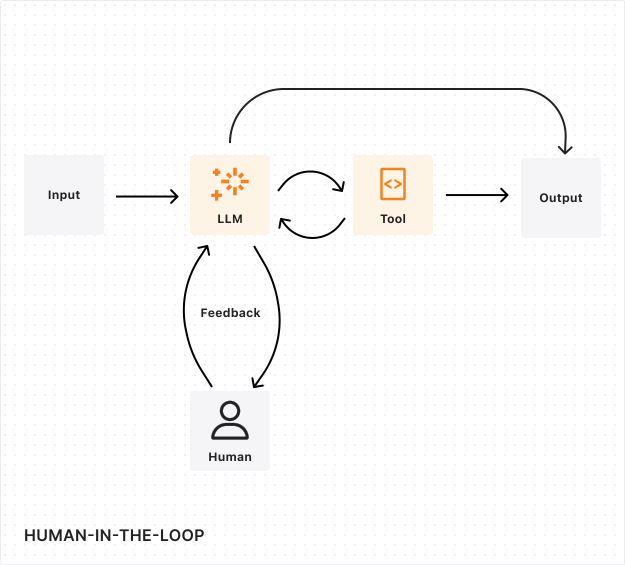
Human-in-the-Loop(HITL,人工参与)工作流将人类的判断与监督整合进自动化流程。这类工作流会在关键节点暂停,等待人工审核、验证或决策后再继续。
为什么要用 human-in-the-loop?
- 合规:法规可能要求某些操作必须经过人工批准。
- 安全:高风险操作(支付、删除、对外通信)需要监督。
- 质量:人工审核能发现 AI 可能漏掉的错误。
- 信任:用户能批准关键操作时会更有信心。
常见用例
| 用例 | 示例 |
|---|---|
| 财务审批 | 报销单、付款处理 |
| 内容审核 | 发布、邮件发送 |
| 数据操作 | 批量删除、导出 |
| AI 工具执行 | 在运行前确认工具调用 |
| 访问控制 | 授予权限、变更角色 |
选择合适的方式
Agents SDK 提供五种 human-in-the-loop 模式。请根据你的架构选择:
| 用例 | 模式 | 适用场景 |
|---|---|---|
| 长时间工作流 | Workflow Approval | 多步流程,可等待数小时或数周的持久化审批关卡 |
| AIChatAgent 工具 | needsApproval | 基于聊天的工具调用,在执行前在服务端进行审批 |
| 客户端工具 | onToolCall | 需要使用浏览器 API 或在执行前需要用户交互的工具 |
| MCP servers | Elicitation | MCP 工具在执行过程中向用户请求结构化输入 |
| 简单确认 | State + WebSocket | 不依赖 AI 聊天或工作流的轻量审批流 |
决策树
Is this part of a multi-step workflow?

├── Yes → Use Workflow Approval (waitForApproval)

└── No → Are you building an MCP server?

         ├── Yes → Use MCP Elicitation (elicitInput)

         └── No → Is this an AI chat interaction?

                  ├── Yes → Does the tool need browser APIs?

                  │        ├── Yes → Use onToolCall (client-side execution)

                  │        └── No → Use needsApproval (server-side with approval)

                  └── No → Use State + WebSocket for simple confirmations
模式 1:工作流审批
适用于带审批关卡的持久化、多步流程,可等待数小时、数天甚至数周。使用 Cloudflare Workflows 与 waitForApproval() 方法。
关键 API:
waitForApproval(step, { timeout })—— 暂停工作流直到被审批approveWorkflow(workflowId, { reason?, metadata? })—— 批准等待中的工作流rejectWorkflow(workflowId, { reason? })—— 拒绝等待中的工作流
最适合: 报销审批、内容发布流水线、数据导出请求
模式 2:needsApproval(AI 聊天工具)
适用于 AIChatAgent 工具,执行前需要用户确认。在工具上定义 needsApproval —— 它可以是 boolean,也可以是一个根据工具入参判断的异步谓词:
JavaScript
tools: {

  processPayment: tool({

    description: "Process a payment",

    inputSchema: z.object({

      amount: z.number(),

      recipient: z.string(),

    }),

    needsApproval: async ({ amount }) => amount > 100,

    execute: async ({ amount, recipient }) => charge(amount, recipient),

  });

}
Explain Code
TypeScript
tools: {

  processPayment: tool({

    description: "Process a payment",

    inputSchema: z.object({

      amount: z.number(),

      recipient: z.string(),

    }),

    needsApproval: async ({ amount }) => amount > 100,

    execute: async ({ amount, recipient }) => charge(amount, recipient),

  });

}
Explain Code
在客户端,从消息片段中渲染待审批项,并调用 addToolApprovalResponse:
JavaScript
const { messages, addToolApprovalResponse } = useAgentChat({ agent });


{

  messages.map((msg) =>

    msg.parts

      .filter(

        (part) => part.type === "tool" && part.state === "approval-required",

      )

      .map((part) => (

        <div key={part.toolCallId}>

          <p>Approve {part.toolName}?</p>

          <button

            onClick={() =>

              addToolApprovalResponse({ id: part.toolCallId, approved: true })

            }

          >

            Approve

          </button>

          <button

            onClick={() =>

              addToolApprovalResponse({

                id: part.toolCallId,

                approved: false,

              })

            }

          >

            Reject

          </button>

        </div>

      )),

  );

}
Explain Code
TypeScript
const { messages, addToolApprovalResponse } = useAgentChat({ agent });


{

  messages.map((msg) =>

    msg.parts

      .filter(

        (part) => part.type === "tool" && part.state === "approval-required",

      )

      .map((part) => (

        <div key={part.toolCallId}>

          <p>

            Approve {part.toolName}?

          </p>

          <button

            onClick={() =>

              addToolApprovalResponse({ id: part.toolCallId, approved: true })

            }

          >

            Approve

          </button>

          <button

            onClick={() =>

              addToolApprovalResponse({

                id: part.toolCallId,

                approved: false,

              })

            }

          >

            Reject

          </button>

        </div>

      )),

  );

}
Explain Code
如需自定义拒绝消息,使用 addToolOutput 并设置 state: "output-error",而不是 addToolApprovalResponse:
JavaScript
addToolOutput({

  toolCallId: part.toolCallId,

  state: "output-error",

  errorText: "User declined: insufficient budget for this quarter",

});
TypeScript
addToolOutput({

  toolCallId: part.toolCallId,

  state: "output-error",

  errorText: "User declined: insufficient budget for this quarter",

});
模式 3:onToolCall(客户端执行)
适用于需要浏览器 API(地理位置、剪贴板、摄像头)或在返回结果前需要用户交互的工具。在服务端定义工具时不写 execute,然后在客户端处理:
JavaScript
const { messages, sendMessage } = useAgentChat({

  agent,

  onToolCall: async ({ toolCall, addToolOutput }) => {

    if (toolCall.toolName === "getLocation") {

      const pos = await new Promise((resolve, reject) =>

        navigator.geolocation.getCurrentPosition(resolve, reject),

      );

      addToolOutput({

        toolCallId: toolCall.toolCallId,

        output: { lat: pos.coords.latitude, lng: pos.coords.longitude },

      });

    }

  },

});
Explain Code
TypeScript
const { messages, sendMessage } = useAgentChat({

  agent,

  onToolCall: async ({ toolCall, addToolOutput }) => {

    if (toolCall.toolName === "getLocation") {

      const pos = await new Promise((resolve, reject) =>

        navigator.geolocation.getCurrentPosition(resolve, reject),

      );

      addToolOutput({

        toolCallId: toolCall.toolCallId,

        output: { lat: pos.coords.latitude, lng: pos.coords.longitude },

      });

    }

  },

});
Explain Code
当 autoContinueAfterToolResult 为 true(默认值)时,客户端提供工具输出后,对话会自动继续。
模式 4:MCP elicitation
适用于在工具执行过程中需要向用户请求额外结构化输入的 MCP 服务器。MCP 客户端会基于你的 JSON Schema 渲染表单:
JavaScript
export class MyMcpAgent extends McpAgent {

  async init() {

    this.server.server.setRequestHandler(

      CallToolRequestSchema,

      async (request, extra) => {

        const result = await this.server.server.elicitInput({

          message: "Please confirm the transfer details",

          requestedSchema: {

            type: "object",

            properties: {

              confirmed: { type: "boolean", description: "Confirm transfer?" },

              notes: { type: "string", description: "Optional notes" },

            },

            required: ["confirmed"],

          },

        });


        if (result.action === "accept" && result.content?.confirmed) {

          return { content: [{ type: "text", text: "Transfer confirmed" }] };

        }

        return { content: [{ type: "text", text: "Transfer cancelled" }] };

      },

    );

  }

}
Explain Code
TypeScript
export class MyMcpAgent extends McpAgent {

  async init() {

    this.server.server.setRequestHandler(

      CallToolRequestSchema,

      async (request, extra) => {

        const result = await this.server.server.elicitInput({

          message: "Please confirm the transfer details",

          requestedSchema: {

            type: "object",

            properties: {

              confirmed: { type: "boolean", description: "Confirm transfer?" },

              notes: { type: "string", description: "Optional notes" },

            },

            required: ["confirmed"],

          },

        });


        if (result.action === "accept" && result.content?.confirmed) {

          return { content: [{ type: "text", text: "Transfer confirmed" }] };

        }

        return { content: [{ type: "text", text: "Transfer cancelled" }] };

      },

    );

  }

}
Explain Code
最适合: 交互式工具确认、在执行中途收集额外参数
工作流如何处理审批
在基于工作流的审批中:
- 工作流走到审批步骤,调用
waitForApproval() - 工作流暂停,并向 agent 上报进度
- agent 用待审批信息更新自己的 state
- 已连接的客户端看到待审批项,可以批准或拒绝
- 批准后,工作流带着审批元数据继续运行
- 若被拒绝或超时,工作流相应地处理拒绝情况
超时与升级
设置超时,避免工作流无限期等待:
JavaScript
const approval = await this.waitForApproval(step, {

  timeout: "7 days",

});
TypeScript
const approval = await this.waitForApproval(step, {

  timeout: "7 days",

});
使用 scheduling 进行升级:
JavaScript
await this.schedule(86400, "sendApprovalReminder", { workflowId });


await this.schedule(604800, "escalateToManager", { workflowId });
TypeScript
await this.schedule(86400, "sendApprovalReminder", { workflowId });


await this.schedule(604800, "escalateToManager", { workflowId });
最佳实践
审计轨迹
使用 SQL API 维护所有审批决策的不可变审计日志。需要记录:
- 由谁做的决策
- 决策时间
- 理由或依据
- 任何相关元数据
长期状态持久化
人工审核流程没有可预测的时间表。审核者可能要几天甚至几周才能给出决定。你的系统需要在整个期间维持状态一致性 —— 包括原始请求、中间决策、部分进度,以及审核历史。
提示
Durable Objects 提供持久化的计算实例,可保持状态数小时、数周乃至数月 —— 非常适合长时间存活的审批流。
持续改进
人工审核者在评估和改进 LLM 表现方面起着关键作用:
- 决策质量评估:让审核者评估 LLM 的推理过程和决策点。
- 边界情况识别:借助人类专业知识识别可改进的场景。
- 反馈收集:收集结构化反馈,用于微调 LLM。AI Gateway 可以帮助搭建 LLM 反馈回路。
错误处理与恢复
你的系统应能优雅处理审核者不可用、系统中断、审核冲突以及超时过期等情况。为异常情况实现明确的升级路径,并设置自动检查点(checkpoint),让工作流在任何中断后都能从最近一次稳定状态继续。
后续步骤
Human-in-the-loop 模式 完整的工作流与聊天工具实现示例。
Chat agents — 工具审批 needsApproval 与 addToolApprovalResponse 参考。
运行 Workflows 工作流审批的完整 API。
MCP elicitation 来自 MCP 客户端的交互式输入。